
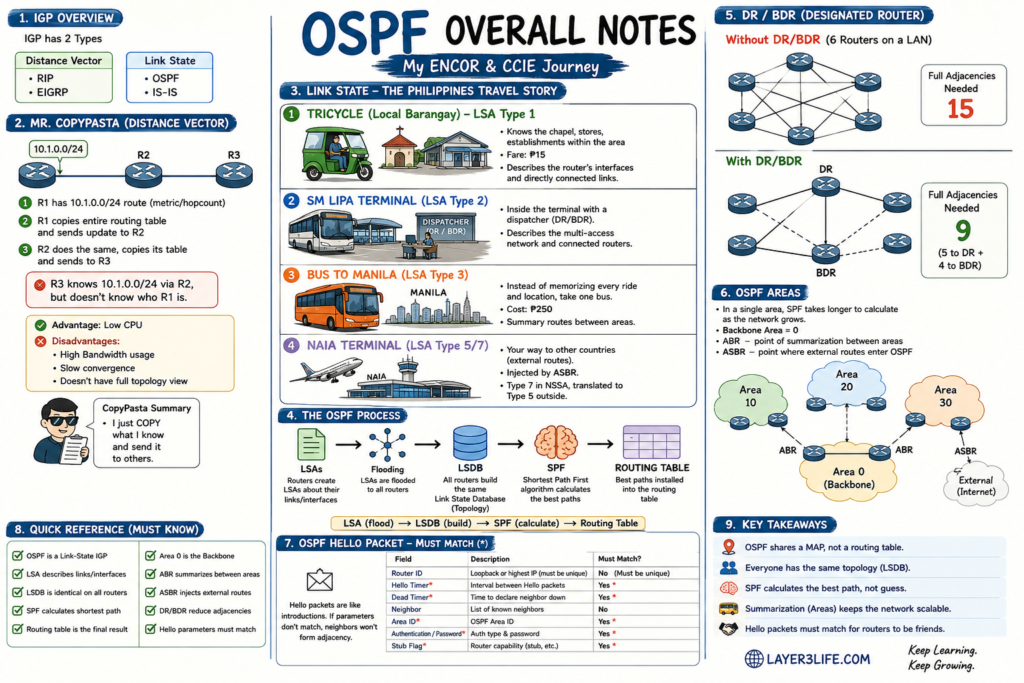
OSPF Explained Like You’re Traveling Across the Philippines
“Part of my CCIE Enterprise Infrastructure Journey.”
I remember concepts much better when I can visualize them.
So instead of memorizing Link State Advertisements, DR elections, and SPF calculations, I imagined traveling across the Philippines.
Oddly enough…
It made OSPF much easier to understand.
Let’s start from the beginning.
Every IGP Has Its Own Personality
If we’re talking about Interior Gateway Protocols (IGP), there are two major families.
| Distance Vector | Link State |
|---|---|
| RIP | OSPF |
| EIGRP* | IS-IS |
Think of them as two different personalities.
Distance Vector says
“I’ll tell you everything I know.”
Link State says
“I’ll tell you how I’m connected.”
That small difference changes everything.
Meet Mr. CopyPasta (Distance Vector)
Imagine three routers.
10.1.0.0/24

     R1 -------- R2 -------- R3
R1 owns network 10.1.0.0/24.
It installs it in its routing table.
Then something funny happens.
R1 literally copies its routing table…
…and sends the entire thing to R2.
R2 copies its routing table…
…and sends everything again to R3.
I like calling Distance Vector…
Mr. CopyPasta
Because that’s exactly what it does.
It doesn’t build a map.
It doesn’t understand the whole network.
It simply copies what it knows.
By the time R3 receives the route:
10.1.0.0/24 via R2R3 knows the network exists.
But R3 doesn’t actually know where R1 is.
It simply trusts R2.
Advantages
✅ Very little CPU processing
Disadvantages
❌ More routing updates
❌ Consumes more bandwidth
❌ Slower convergence
Link-State Thinks Differently
Instead of saying
“Here’s my routing table.”
A Link-State router says
“Here’s what my interfaces look like.”
Every router describes itself.
Not the whole network.
Just itself.
This information is called a
Link State Advertisement (LSA).
Imagine Traveling Around the Philippines
Now let’s use transportation as our network.
LSA Type 1 — The Tricycle Driver

Imagine riding a tricycle inside your barangay.
The driver knows:
- every street
- every chapel
- every sari-sari store
- every subdivision
- every shortcut
He doesn’t know Manila.
He only knows his local neighborhood.
That’s exactly what LSA Type 1 does.
Each router advertises its own interfaces and directly connected links.
It only describes itself.
Not everyone else.
LSA Type 2 — The Bus Terminal Dispatcher

Now you’re at SM Lipa Terminal.
Instead of every passenger shouting to everyone else…
there’s a dispatcher.
The dispatcher organizes everything.
In OSPF, that’s the:
- Designated Router (DR)
- Backup Designated Router (BDR)
Instead of every router talking to every other router,
everyone talks to the dispatcher.
Much cleaner.
Much more efficient.
LSA Type 3 — The Bus Going to Manila

Imagine living in Batangas.
You want to go to Manila.
Would you memorize every jeepney…
every tricycle…
every intersection…
every street…
before reaching Manila?
Probably not.
Instead…
you simply board one bus.
The bus costs ₱250.
That’s your summary.
That’s exactly what an Area Border Router (ABR) does.
Instead of advertising thousands of individual routes,
it summarizes them.
Your router doesn’t need every detail.
It simply knows
“Take this path toward Area 0.”
That’s LSA Type 3.
LSA Type 5/7 — NAIA

Eventually…
you arrive at NAIA.
From there…
you can leave the Philippines entirely.
Maybe Singapore.
Maybe Japan.
Maybe Australia.
Those destinations aren’t inside your local transportation system.
They’re external.
Exactly like external routes in OSPF.
An ASBR injects those routes into OSPF.
For NSSA areas, this is represented as LSA Type 7, which is translated into Type 5 when leaving the NSSA.
The Big Picture
Once every router shares its own story…
those LSAs are flooded across the network.
Every router receives exactly the same information.
This collection is called the
Link State Database (LSDB)
Think of the LSDB as Google Maps.
Every router has the same map.
Nobody has a different version.
Only after building that map…
the router finally runs the SPF algorithm.
LSAs
   │
   ▼
Flooding

   │
   ▼
LSDB

   │
   ▼
SPF Algorithm

   │
   ▼
Routing Table
Notice something important.
The routing table comes last.
OSPF (Shortest Path First)
The SPF algorithm studies the complete topology.
Instead of trusting another router,
it calculates the best path itself.
Think of opening Google Maps.
Google doesn’t ask another driver which road is fastest.
It calculates everything.
That’s exactly what OSPF does.
Why Do We Need DR and BDR?
Imagine six routers connected to one Ethernet switch.
Without DR/BDR:
Every router forms a Full adjacency with every other router.
6 routers

15 Full Adjacencies
With DR and BDR:
Each router only forms Full adjacency with:
- DR
- BDR
Result:
Only 9 Full AdjacenciesMuch less overhead.
Much easier to scale.
Why OSPF Uses Areas
Imagine one gigantic city map.
As the city grows…
Google Maps needs longer to calculate routes.
OSPF behaves the same way.
A huge LSDB means:
- more SPF calculations
- more CPU
- longer convergence
That’s why we divide networks into Areas.
Area 10

Area 20

Area 30

        │
        │
Area 0 (Backbone)
Area 0 connects everything.
ABRs summarize routes between areas.
Hello Packets
Before routers become neighbors…
they introduce themselves.
Think of two strangers meeting.
If they don’t speak the same language…
they won’t become friends.
These fields must match:
| Field | Must Match? |
|---|---|
| Hello Timer | ✅ |
| Dead Timer | ✅ |
| Area ID | ✅ |
| Authentication | ✅ |
| Stub Flag | ✅ |
Router ID does not have to match—it must be unique across the OSPF domain.
Router ID selection order:
- Manual router-id
- Highest loopback IP
- Highest active physical interface IP
ENCOR Quick Reference
| Topic | Must Know |
|---|---|
| Distance Vector | Sends routing tables |
| Link State | Sends interface information |
| LSA | Information describing links |
| LSDB | Complete network topology |
| SPF | Calculates shortest path |
| Area 0 | Backbone Area |
| ABR | Connects multiple areas |
| ASBR | Redistributes external routes |
| DR | Central point on multi-access networks |
| BDR | Backup for DR |
| Hello Timer | Must Match |
| Dead Timer | Must Match |
| Area ID | Must Match |
| Authentication | Must Match |
| Stub Flag | Must Match |
| Router ID | Must be unique |
Final Thoughts
This article is the first part of my OSPF review as I work toward the CCIE Enterprise Infrastructure certification.
I’m documenting these concepts in a way that makes them easier to remember—not just for myself, but hopefully for anyone else preparing for the ENCOR exam or starting their CCIE journey.
If this analogy helped you understand OSPF a little better, stay tuned. In the next article, I’ll dive deeper into OSPF neighbor formation, adjacency states, and packet types. Happy studying!