
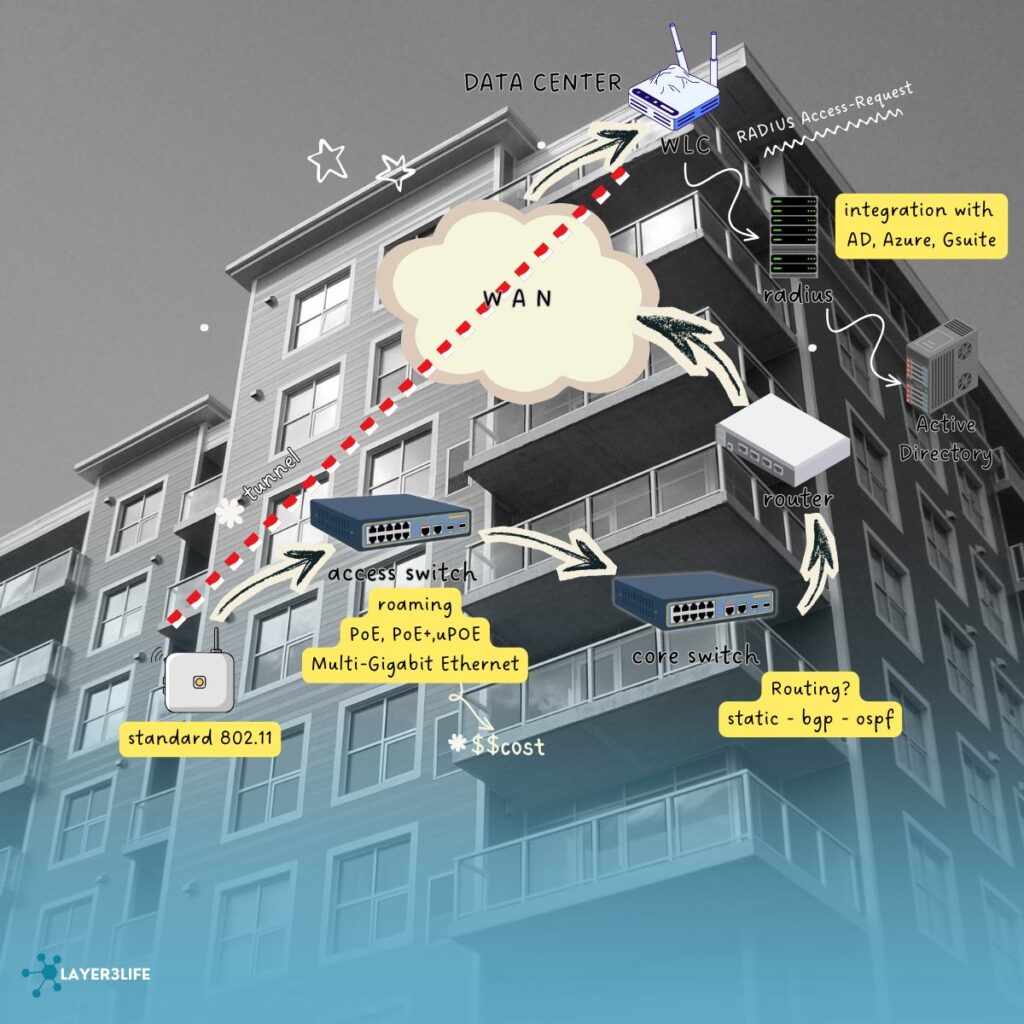
Today, let’s talk about wireless design and the key components used in enterprise networks. This is a summary of what I’ve learned from my research and, of course, a little bit of “YouTube University” 😄
Multi-Gigabit Ethernet and Future-Proofing Network Switches
The use of multi-gigabit ports supporting 1, 2.5, 5, and 10 Gbps on switches to enable high-performance wireless AP connections and discusses cost implications of investing in such switches. This is presented as a balance between performance gains and increased costs.
Authentication Architectures Using RADIUS and Identity Providers
Local user management on WLCs is limited in scalability, so organizations typically deploy centralized RADIUS servers (e.g., Cisco ISE, Aruba ClearPass) for authentication. These RADIUS servers integrate with Active Directory or cloud-based identity providers to validate credentials. Post-authentication, network policies—such as role-based access, VLAN assignments, and QoS—can be applied consistently across the network.
Key Consideration when designing a wireless lan network:
1. Types of application expected in the network, e.g. web browsing, voip call, software or streaming.
2. Technologies that Wi-Fi infrastructure support (802.11 a/b/g/n/ac)
3. Number of client devices that connect to the Wi-Fi network simultaneously (helps to determine the number of spatial streams, technology, and access point types).
4. Key geographical areas you need to cover and provide Wi-Fi in and the number of concurrent devices per area.
5. Power constraints. It’s way more useful to have an infrastructure equipped with PoE+ that allows you to support high-performing access points.
Application:
High-throughput apps like video reduce the number of clients you can support per AP. Getting the application requirements is the foundation of a proper WLAN design. Without it, you’re basically guessing and in wireless, guessing = poor user experience.
Scaling:
- Number of concurrent subscriber
- number of subscriber in 24hrs
- Rates of authentication
- DHCP Exhaustion
- Types of authentication or accounting
- Timers, IDLE, Session EAP
- CAM Limits
Interim Accounting in Cisco WLC continuously reports client session stats to RADIUS—default on, occurs on roaming, and configurable in the policy profile to maintain accurate usage tracking. Let’s apply to the importance of Interim Account on the following scenarios:
a. Public Wi-Fi Hotspots (Airports, Malls, Cafes) 🏢✈️- Interim Accounting ensures the system knows exactly how much a client has used, even if they move between APs.
b. Enterprise Networks with Roaming Employees 💼🏢- IT wants to monitor data usage, VoIP call duration, or troubleshoot network performance.
✅Whenever client mobility, billing, quota enforcement, or detailed usage monitoring is required, Interim Accounting is essential.
From BRKEWN-2054 release, we need to watch out for the below.:
1️⃣ RADIUS Messages on RMI in SSO – In a WLC SSO (primary + secondary) setup, RADIUS messages can appear from the RMI (Redundant Management Interface). If these RMI messages aren’t properly recognized, authentication may fail or get delayed.
- Action: Add both wireless management and RMI IPs as network devices in AAA.
- Day-to-day impact: Prevents unexpected login/authentication issues for clients.
Add both the wireless management and the RMI IP to your AAA server, because sometimes SSO WLCs talk to RADIUS from the RMI IP instead of the main management IP. Most admins only add the wireless management IP, which is why this problem pops up.
2️⃣ AirDrop & AWIPS – Apple devices may create AirDrop sessions, which are flagged by AWIPS/WIPS (Wireless Intrusion Prevention System) as threats. This can spike CPU usage on the controller, slowing down the WLAN for all users.
- Action: Disable AWIPS or remove AirDrop sessions from WIPS policy.
- Day-to-day impact: Keeps WLAN stable, avoids performance degradation during normal office operations.
3️⃣ WIPS / Air Marshal Policy – Many organizations don’t have a WIPS policy. If WIPS is left on default, it may incorrectly block devices or generate unnecessary alerts.
4️⃣ RADIUS Load Balancing – RADIUS load balancing works only for 802.1X / MAB, not CWA (Central Web Authentication). Using load balancing incorrectly with CWA may break captive portal logins.
5️⃣ Wi-Fi 7 Client Compliance Checks – Wi-Fi 7 deployments have strict SSID config compliance checks. Misconfigured clients may fail to connect, creating support tickets.
C9800 WLC AP limits—easy to read and remember:
| WLC Model | Nickname | Max Flex APs per Site | Notes |
|---|---|---|---|
| 9800H | 9800‑80 | 🟢 High (Large Sites) | High-end, supports more APs ✅ |
| 9800M | 9800‑40 | 🟡 Medium (Medium Sites) | Mid-range, fewer APs ⚠️ |
✅Choose your WLC model based on how many APs you need per site to avoid overloading the controller and ensure smooth Wi-Fi.
Meraki MR Scale—easy to read and remember:
| Meraki AP Series | Max APs per Network | Notes / Day-to-Day Impact |
|---|---|---|
| MR20 / MR30 / MR33 | ~50–60 APs per network | Small-to-medium deployments (offices, small campuses) ✅ |
| MR42 / MR53 / MR56 | ~100 APs per network | Medium-to-large deployments, supports more clients per AP ⚡ |
| MR84 / MR86 / MR57 (Wi-Fi 6 / 6E) | ~200 APs per network | High-density environments like stadiums, universities 🏟️ |
AAA Scale in Wireless Networks
Ensures clients can connect (Auth), get the right permissions (AuthZ), and their usage is tracked (Acct).
❓❓ Why AAA Scale Matters❓❓
High-Density Environments –
- Large offices, campuses, stadiums → hundreds or thousands of users may authenticate at the same time.
- If AAA servers can’t handle the load, clients may experience delayed logins or dropped connections.
Intermittent Roaming
- Clients move between APs → WLC sends re-auth requests to AAA servers.
- Server scale must support burst authentication traffic during busy periods.
Accounting / Quotas
- Tracking usage per client for billing, quota enforcement, or reporting requires AAA scale to process concurrent accounting messages.
🟢💯Key Numbers / Guidelines (Cisco Reference)💯🟢
| Component | Typical Scale Consideration | Notes |
|---|---|---|
| AAA Server (RADIUS / TACACS+) | 5,000–10,000 simultaneous sessions per server | Depends on hardware, software, and network latency |
| WLC + AAA Pairing | Each WLC can send hundreds of concurrent requests | Consider load balancing across multiple AAA servers |
| Interim Accounting | Updates every 5–15 minutes (configurable) | Too frequent → AAA overload, too sparse → delayed reporting |
👉In large deployments, deploy multiple AAA servers and use load balancing to avoid bottlenecks.
What is WNCD?🤔
It is a software process running on Cisco WLCs (both Catalyst 9800 and AireOS WLCs). Handles control plane tasks for APs and client management. Essentially, it’s the “brain” inside the WLC that keeps APs and client sessions running smoothly.
WNCd is already built into the Cisco Catalyst 9800 WLC platform. You don’t need to install it separately.
+——————+
| WLC IOS-XE |
+——————+
| WNCd (control)| <– handles APs, clients, AAA, RF
| Other daemons | <– e.g., CAPWAP, AAA, WIPS
+——————+
| Hardware / CPU |
+——————+
NCd is part of the control plane, coordinating all APs and clients. When troubleshooting WLC issues, logs often mention WNCd (e.g., AP joins failing, RADIUS communication errors).
- Multi-Floor Enterprise Offices 🏢⬆️ APs across floors are tagged by floor/site. Site Tag Based + Load Input ensures that:
APs on each floor don’t overload one controller
Clients moving between floors are dynamically reassigned if a WLC is busy
Benefit: Smooth roaming, better QoS for VoIP or video calls.
What is Eduroam?🤔
Eduroam = “education roaming”. A global Wi-Fi roaming service for students, researchers, and staff at participating universities and institutions. Allows a user to authenticate at any Eduroam site worldwide using their home institution credentials.
Eduroam Approach (the different part)
- Uses federated authentication via RADIUS hierarchy.
- Users authenticate using their home institution credentials wherever they go.
- No need for manual guest account creation.
- Works seamlessly across multiple campuses or countries.
High Level Flow:
- A visiting student connects to Eduroam SSID ✅
- Wireless AP forwards authentication to local RADIUS → Eduroam federation → home institution RADIUS
- If credentials are valid, client gets Wi-Fi access immediately
- IT doesn’t need to create guest accounts for visitors ✨
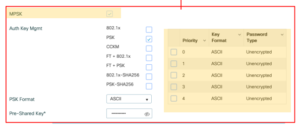
Multi PSK (MPSK)?🤔
• Can configure up to 5 different PSK per WLAN
• (Optional) ISE may be used for validating MAC address
• Supported with C9800 16.10+, not AireOS
• No WPA3 support (Catalyst or Meraki)
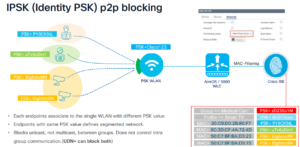
What is IPSK?🤔
PSK (Identity PSK) = a Wi-Fi authentication method that combines:
- Pre-shared key (PSK) → like a regular Wi-Fi password
- User identity (username) → unique per user
High Availability, How do I include this in my design?🤔
High Availability (HA) ensures continuous Wi-Fi service even if a controller fails. Important for enterprise campuses, hospitals, universities, or large public venues where downtime is unacceptable.
1️⃣Active/Standby HA (SSO – Stateful Switchover)
- Setup: Two WLCs in a cluster:
- Active WLC → serves clients and manages APs
- Standby WLC → keeps session info synced in real-time
- Key Features:
- Session-aware failover → clients maintain connectivity
- APs switch automatically to standby if active fails
- Best For: Campus networks where uptime is critical
2️⃣N+1 HA (Redundancy via Additional Controllers)
- Setup: One extra WLC handles failover for N WLCs.
- Key Features:
- Not every WLC has a dedicated standby
- Standby can take over multiple active WLCs if needed
- Use Case: Large deployments with many WLCs, cost-sensitive
3️⃣AP FlexConnect / Local Mode Failover
- Setup: APs in FlexConnect mode continue serving clients locally even if WLC connection is lost
- Key Features:
- Clients maintain connectivity within branch sites
- Minimal disruption during WAN outage to WLC
- Best For: Remote or branch offices
4️⃣Mobility Group + Redundant WLCs
- Setup: Multiple WLCs in Mobility Group, sharing:
- AP configs
- Client roaming info
- Controllers are in same or different sites
- Key Features:
- Seamless roaming across controllers
- Load balancing + redundancy
- Best For: Multi-building campuses or high-density environments
| Requirement | Explanation |
|---|---|
| Same SW Version / Form Factor | Active and standby controllers must run the same software version and be the same model for session sync. |
| Maximum RP link latency = 80 ms RTT | Round-trip latency between active & standby controller must be ≤80ms; higher latency can cause session sync failures. |
| Minimum bandwidth = 60 Mbps | Ensure enough bandwidth for stateful session replication between controllers. |
| Minimum MTU = 1500 | Proper packet size to avoid fragmentation on the replication / CAPWAP traffic. |
| Supported in VMs via virtual switch | Virtual WLCs can use SSO if underlying virtual network supports RMI / CAPWAP replication. |
| RMI secondary inter-link | Redundant Management Interface (RMI) provides a backup path if the RP (Redundant Port) goes down. |
| RMI = secondary IP on Management SVI | RMI IP must be in same subnet as management IP so heartbeat and gateway checks work. |
| Gateway check via RMI | WLC pings gateway via RMI every 1 second, using 4 ICMP + 4 ARP probes to detect failures. |
| Redundant controller not an option | If RMI detects failure or requirements are not met, the standby controller cannot take over. |
High Availability Architectures for APs
- AP Dual Connection
- Overlapping Coverage
Switching for AP HA
• Perpetual PoE
• Fast PoE
• Stack Power
• Stackwise
• Stagger Switches
1️⃣ ISSU (In-Service Software Upgrade) Overview
- ISSU allows you to upgrade the WLC software without taking down Wi-Fi services for clients.
- Key goal: clients and APs stay connected while the WLC is upgraded.
- Works with Catalyst 9800 series (and AireOS with some limitations).
2️⃣ Rolling AP Upgrade
- When you upgrade WLC software via ISSU:
- WLC triggers neighbor marking → APs know which WLC is active / standby.
- APs upgrade in batches, not all at once → prevents Wi-Fi downtime.
- With N+1 HA, a spare WLC can take over APs if an AP loses connection during upgrade.