
I’d like to tell you a story about ZTNA. Imagine your company is like a big castle. Inside, there are many rooms, each with important stuff, like treasure, secrets, or your favorite toys. But now, some people want to work from far away, outside the castle. How do you let them in without letting strangers steal things?
That’s where Fortigate VPN and ZTNA come in!
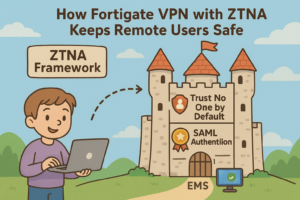
Step 1: Trust No One by Default (ZTNA)
In the old days, if someone got through the castle gate, they could walk anywhere. That’s risky! With ZTNA, everyone—even friends, must show ID at every door. You only see the rooms you’re allowed to enter.
ZTNA integrates with FortiOS to dynamically create access policies based on user identity, device posture, location, and time. Policies are enforced per-session rather than per-network, making unauthorized access virtually impossible.
Step 2: Verifying Identity with SAML Authentication
Before a remote worker can enter, they must prove their identity—like showing a magical badge. FortiGate leverages SAML (Security Assertion Markup Language) for authentication:
-
Users log in via a central Identity Provider (IdP) such as Okta, Azure AD, or Ping Identity.
-
FortiGate receives a SAML assertion, confirming the user’s identity and roles.
-
Access is granted only to applications or resources that match the user’s role.
SAML-based SSO ensures credentials are never directly shared with FortiGate, reducing attack surfaces and simplifying multi-factor authentication (MFA) integration.
Step 3: FortiClient—The Magic Key
Remote users need FortiClient, the endpoint agent that acts as their magic key:
-
Manual deployment: Users input the FortiGate VPN or ZTNA portal URL to connect.
-
Automated deployment: Tools like Group Policy (GPO) or Microsoft Intune can push FortiClient and configurations to endpoints, simplifying onboarding.
FortiClient continuously checks:
-
Device posture (antivirus status, OS patch level, disk encryption)
-
Compliance with security policies
-
Network connection to the FortiGate gateway
FortiClient supports both IPsec SSL VPN and ZTNA connections, automatically switching between them depending on the security context. This ensures uninterrupted, secure access.
Step 4: EMS—The Castle Watchdog
FortiClient communicates with FortiClient Enterprise Management Server (EMS), acting as a watchdog:
-
Monitors the health and posture of endpoints
-
Enforces compliance policies before allowing access
-
Provides visibility and reporting to IT admins
EMS allows centralized policy enforcement, automated remediation for non-compliant endpoints, and granular visibility into remote sessions, reducing security risk across the organization.